容器化技術概念介紹與實作
容器是什麼?
vm 硬體資源利用最大化 容器化: 程式包成 container image (就像ISO檔案) 包含 runtime, system setting, main program run 起來之後的檔案在容器刪掉之後都會不見,例如: LogFile 產生檔案,上傳檔案之類的服務 更版的時候 image 裡面的檔案都會不見,sln-> 設定對應的實體硬碟,檔案就會丟過去 主程式結束,docker就結束,如果裡面有其他程式在跑,不會知道 ‘執行中的 container 可以轉成 image’ 容器技術 is 輕量虛擬化 作業系統 無狀態 永遠不會更新
微服務
將系統切分成小項目container image,彼此用 API 做溝通 複雜性變高 >> 自動化 > 無狀態~ 如果要有狀態的,就獨立出來一個 Services 給大家做使用(例如 File Upload download)
docker
--rm 主程式 停掉就刪除
attach 加檔案
exec 執行容器內某一程式
指定 主程式
-d 背景
-p 8080:80 本機 8080 對應至 docker 80
-e Default_connection=123 設定環境變數
logs + id 看log
ps -a
-v 掛載本機磁碟 -v G:\Project:/Project
control-p control-q 退出容器不停止
--restart=always 容器永遠執行
-P 所有的 port 都掛上去
--privileged 就會有管理員的權利,所以不要隨便亂用
軟體部署
可動態 改變不同設定、新增功能 《組態飄移》 利用微服務架構來 ‘分類’及‘管理’
主從式架構
client 透過 restapi 呼叫 docker deamon (docker host)
執行container 裡面的 bash docker exec -it ContaineriID bash 安裝 apt & cowsay apt update && apt-get install cowsay -y 執行 cowsay cowsay
檔案
兩個docker 共用檔案伺服器 docker 只讀 docker 只寫
反向代理
ect > nginx > conf.d > default.conf
location / {
    proxy_pass https://www.skl.com.tw;
    proxy_set_header Host www.skl.com.tw;
}
建立 nginx 80 對應至本機 8080 docker run --name myng -it -d nginx:latest -p 8080:80
重啟伺服器 docker exec -it containerid nginx -s reload
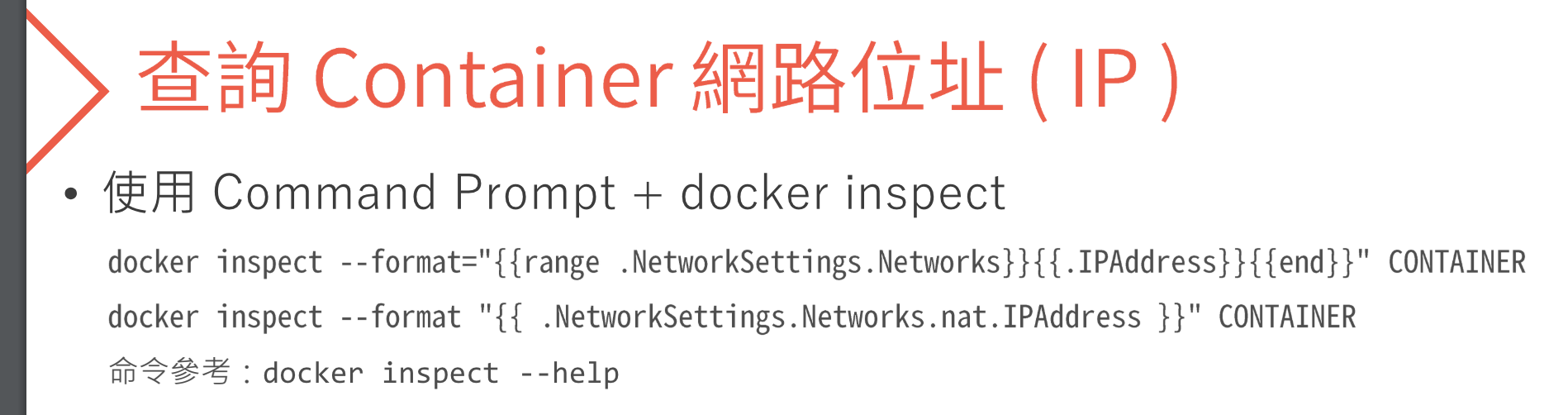
網路環境
 espanso
docler cp
docker cp /Users/hansjiang/Project/DockerSession/ /ubuntu:Temp docker cp TEMP ubuntu:/TEMP /Users/hansjiang/Project/DockerSession/
docker create
只建立容器但是不跑他 還是可以 cp 檔案出來
docker 同網段
--network n1 image
muti stage build
置換 appsetting json 內容
docker -e Log__Loglevel=Trace
在 Dockerfile 設定連線字串
-e ENV = ConnectionString__ATT ITATTDB000
為什麼不要當VM用
一台VM可以跑多AP 一個container 跑多個AP會把問題複雜化
外包商開發時
僅能使用我們許可的image
容器逃逸 從容器跳出來將病毒植入實體主機 須定期更新容器引琴
供應鏈投毒
供應鏈劫持 降低image layer 層數
惡意容器
container 執行時
跑起來時會是最大權限
https://podman.io/features podman: reahat 做的 docker
https://containerd.io/ containerd K8s使用的 runtime
image
docker run image 一個 repository 可以有很多個 image 一個 registry 有很多個 repository image id = image hash直 tag 預設為 latest (標籤 or 版號)
不同 repository 不同 tag 可以指向同一個image 不同 repository 可指向同一個 image id
repository + tag 就是一個別名,最終指像一個 image id
docker scout
docker scout enroll hansjiang1123 â Successfully enrolled organization <ORG_NAME> with Docker Scout Free
docker scout repo enable --org hansjiang1123 hansjiang1123/scout-demo
docker buildx build --provenance=true --sbom=true --push -t hansjiang1123/scout-demo:v4 .

docker build --provenance= true --sbom true --push -t hansjiang1123/scout-demo:v3 .
Net 8 Live Demo
跑 docker 不用勾選 https
因為要包前端,所以要 use staticFiles
我需要建置一個 an v18 的專案, 幫我加入一個 stage 步驟 我要用 production build
插入 Dockerfile final 前 xxx/. xxx目錄下所有檔案
最後在 copy 到 wwwroot
npm install module 空間站很大
要改 .dockerignore
skl-froint/node-modules
docker run -d --name -rm -p 8080:8080
docker exec -it skl-docker ls -laF /app/publish/wwwwroot/browser 確認網頁有call 進去
app.use defalutfile()
type XXX.bat | clap.exe 複製
linkchecker
連結檢查
Day 4
https://tinyurl.com/yc7s6fe6 https://github.com/srcmesh-workshop/docker-workshop
連線方式:
Grafana: http://35.201.170.213:3000/ Graylog: http://35.201.170.213:9000/
帳密: admin / srcmesh-1234 user-1 srcmesh-123456789
CICD
image build once use any where dev QA Op 都用同一份
Tag 策略
如果一月的 image 遺失,再次包的 image tag 值不可以一樣,因為供應商 package 版本可能會更新 1/1 foobar commmit timestampe 6/1 foobar commmit timestampe
資料持久化
Bind Mounts $pwd 現在在哪裡
可用性
F5> 多台 host> nginx 反向代理> docker
健康檢查
檢查區間 interval: 5 秒鐘 超時時間 timeout: 依據高低峰平均值去設定 重試次數 3~5 次 有沒有活著 跟 可不可以服務、接受新的流量 accept request
cron 排成腳本 定時做 docker restart srcmesh-123456789
container 設計原則
"https://github.com/srcmesh-workshop/docker-workshop
連線方式:
Grafana: http://35.201.170.213:3000/ Graylog: http://35.201.170.213:9000/
帳密: admin / srcmesh-1234 "
"https://github.com/srcmesh-workshop/docker-workshop
Grafana: http://35.201.170.213:3000/ Graylog: http://35.201.170.213:9000/
帳密: admin / srcmesh-1234 "
                user-1
                srcmesh-123456789
docker container run
docker container run -dit \ --name user-01 \ -v $(pwd):/usr/share/nginx/html \ -p 10001:80 nginx:alpine \ --health-cmd "curl -f http://localhost:80/ || exit 1" \ --health-start-period=10s \ --health-interval=5s \ --health-retries=2 \
curl http://localhost:10001/
srcmesh-123456789 你現在是一個Net Core MVC 專家,Controller有一個Action負責將使用者的檔案傳送至外部一支影像辨識API,API經過處理後將檔案內容回覆給使用者, 一個檔案內容可能會有多筆資料回覆,目前面臨一個挑戰,這支影像辨識API單次處理時間為五分鐘,在View與使用者互動時,使用者一次上傳20個檔案的情況時,非常耗時, 如何確保網頁服務正確且不影響使用者在前端的使用,並即時將影像辨識API處理結果,回覆給使用者? 請提供實際程式碼
day 5
預設的一個 CPU 週期為 100ms • --cpus=0.25 即為 100ms * 0.25 = 25ms → 這個容器在每個 CPU 時間週期內最多可使用 25ms (即 CPU 使用率為 25%)
多階段建構,可瘦身 image
語意化版本 https://semver.org/lang/zh-TW/
hans on lab
DockerComposeTest HansJiang OcrHH23bD9EzDjcRhR
day 6
"https://github.com/srcmesh-workshop/docker-workshop
連線方式:
nginx: image: nginx:latest container_name: nginx volumes:
  - ./nginx.conf:/etc/nginx/nginx.conf:ro
ports:
  - '12345:80'
depends_on:
  - wordpress
logging:
  driver: gelf
  options:
    gelf-address: udp://127.0.0.1:12201
healthcheck:
  test: ['CMD-SHELL', 'curl -f http://localhost || exit 1']
  interval: 30s
  timeout: 10s
  retries: 3
restart: unless-stopped
services: nginx: image: nginx:latest container_name: nginx volumes:
  - ./nginx.conf:/etc/nginx/nginx.conf:ro
ports:
  - '12345:80'
depends_on:
  - wordpress
logging:
  driver: gelf
  options:
    gelf-address: udp://127.0.0.1:12201
healthcheck:
  test: ['CMD-SHELL', 'curl -f http://localhost || exit 1']
  interval: 30s
  timeout: 10s
  retries: 3
restart: unless-stopped
wordpress: image: wordpress:latest container_name: wordpress environment: WORDPRESS_DB_HOST: db WORDPRESS_DB_USER: exampleuser WORDPRESS_DB_PASSWORD: examplepass WORDPRESS_DB_NAME: exampledb depends_on:
  - db
logging:
  driver: gelf
  options:
    gelf-address: udp://127.0.0.1:12201
healthcheck:
  test:
    ['CMD-SHELL', 'curl -f http://localhost/wp-admin/install.php || exit 1']
  interval: 30s
  timeout: 10s
  retries: 3
restart: unless-stopped
db: image: mysql:8 container_name: db environment: MYSQL_ROOT_PASSWORD: examplepass MYSQL_DATABASE: exampledb MYSQL_USER: exampleuser MYSQL_PASSWORD: examplepass volumes:
  - db_data:/var/lib/mysql
logging:
  driver: gelf
  options:
    gelf-address: udp://127.0.0.1:12201
healthcheck:
  test:
    [
      'CMD-SHELL',
      'mysqladmin ping -h localhost -u root --password=examplepass || exit 1',
    ]
  interval: 30s
  timeout: 10s
  retries: 3
restart: unless-stopped
volumes: db_data:
day 6
source code 會有什麼資安議題 package - CVE hard code password - Vault CICD後在Server 加密 sql injection token
conotainer 會有什麼資安風險 port package volunm root 權限
容器化隔離
- 解 image 漏洞,拉image 時用 checksum 去pull , 不要用 版本號去拉(避免拉到駭客的版本)
"https://github.com/srcmesh-workshop/docker-workshop
Prometheus: http://34.80.76.80:3000 Graylog: http://34.80.76.80:9000
帳密:admin / srcmesh-1234 " srcmesh-123456789
image-ref : 'mysql:oracle'
                    vim .github

        vim .github/workflows/image-scan.yaml
ssh user-1@34.80.76.80 srcmesh-123456789 runner-1
nginx:latest wordpress:latest mysql:8
name: Test run: | ls shell: bash
name: Test run: | docker ps shell: bash
update conntainername
cd .cache/ans/single docker compose up -d